lollipop etiketine sahip kayıtlar gösteriliyor. Tüm kayıtları göster
Lollipop ROM: Xperia Z5 For S3 i9300

Lollipop ROM: Xperia Z5 For S3 i9300

After a long time,and we get a Xperia Z5 there was something similar to it but wasn't updated after.
P.S.I haven't tried a it so make sure you do the necessary backup


Features:-

• Xperia Z5 SystemUi
• Xperia Z5 Home
• Xperia Z5 Boot Animation
• Xperia Z5 Setup Wizard
• Xperia Z5 Album
• Xperia Z5 Music
• Xperia Z5 Videos
• Xperia Z5 Clockwidgets
• Xperia Z5 SemcClock
• Xperia Z5 Calender
• Xperia Z5 KeyBoard
• Xperia Z5 Backup and Restore
• Xperia Z5 Clock
• Xperia Z5 Photo Editor
• Xperia Z5 Weather App
• Xperia Z5 Care
• Xperia Z5 Media Sounds
• Xperia Z5 Live Wallpaper
• Xperia Z5 Calculator
• Xperia Z5 World Clock Widget
• Xperia Z5 Top Contacts Widget
• Xperia Z5 Wallpaper
• Xperia MovieCreator
• Xperia What's New
• Xperia Z5 SocialLife
• Xperia X5 LifeLog
• Xperia Z5 Sketch
• Xperia Z5 TrackID
• Xperia Z5 Themed Settings
• Xperia Z5 Lounge
• Xperia Z5 Transfer Mobile
• Xperia Z5 Diagnostics
• Xperia Z5 Sound Picker
• Xperia Share application
• Xperia with Facebook
• Xperia with Twitter


DOWNLOADS:-
Credits:@Shujath

Lollipop ROM:Pure Cyanogemod 12.1 For S3 i9300

Developed by JustArchi and Trafalgar Square.
I wanted to upload it,but was in its initial stage.Its been around since CM12S,@justarchi has provided large amount of contribution to the S3 XDA Community.This is based on CyanogenMod repository though maintained by JustArchi.


DOWNLOAD:
Video preview by Dimitrology


-Happy Winters ;)
Lollipop/Marshmallow ROM:Minimal OS for S3 i9300

Lollipop/Marshmallow ROM:Minimal OS for S3 i9300


Here is one of the first intergrated RRO layer rom,a very famous AOSP rom ported to S3 i9300 by @Gokulbalram


Its very similar to other roms but its based on a cyanogen.
Sorry i think that was too short,but its as good as SlimLP.

SCREENSHOTS:-


DOWNLOADS:-


FOLLOW THE PROJECT ON Google+ :-

BitSyko Layers Vs CyanogenMod Themes

BitSyko Layers  VS Cyanogenmod Themes


Now this is difficult as it seems.Cyanogen has been in this business since the start and has always been more productive.Themes was that one sole feature which Cyanogen is highly dependent on.Apart from various other customizations.
              The gap between Cyanogen And AOSP has already started to fade.After Google got aggressive with the Lollipop version,which has easy access to Wifi and bluetooth and has a wifi-direct support.
      Layers RRO/Layers Manager currently only supports some ROMs like Chroma,Slim,Tesla etc as it is in development.But the amount of response it has been getting is just good.Basically it is portable and does not come preinstalled (at least in some ROMs).What it does it overrides the icons,colors in applications,the best part is that these themes also work on downloaded apps if its been available from theme.
                You can use multiple theme's into one. i.e. one theme for one app the second for another.The themes were basically in development since May.


Cyanogen Themes:-

  1. Many themes available.
  2. Individual icons,lockscreen,bootanimation.etc


BitSyko Layers:-

  1. Can be Uninstalled.
  2. Overrides the framework.
  3. Individual apps can be themed.
  4. Change the navigation bars,notification icons.


Both are totally different but if you observe one has a serious advantage over the other,no i am not talking about the CM,simply because it saves more battery and space. 


-By Anoop
    

Official Touchwiz Lollipop Theme For S3 i9300

Official Touchwiz Lollipop Theme For S3 i9300

Please note that you need a S5 or Note 4 ROM such as Blekota,DN4.This theme is strictly for S3 i9300.


Official Touchwiz theme

Touchwiz Edge Theme


DOWNLOADS:-

Lollipop ROM:Touchwiz S6-based MD4 ROM

Lollipop ROM:Touchwiz S6-based MD4 ROM

This is the next build from the MD4 team.
It is mostly similar to the previous MD4 but the fact that it wants to provide almost every S6 feature.

Its based on Kitkat 4.4 as samsung hasn't revealed the sources.
This is the initial build and the next update will include Note-5 also.


Full Features:

- S6 Accuweather
- S6 TouchWiz Home
- S6 Messags
- S6 Settings
- S6 Keyboard
- S6 Gallery
- S6 SystemUI
- S6 My Files
- S6 Calculator
- S6 WallpaperPicker
- S6 S Browser
- S6 Dialer and Contacts
- S6 Video App
- S6 Memo
- S6 Voice Recorder
- S6 lockscreen 
- S6 Music


Installation :


-Wipe Factory Reset.
-Wipe cache  and dalvik_cache
-flash now M.D.4 using recovery
-Reboot.

DOWNLOADS:

Lollipop ROM:Dokdo Project for S3 i9300


This ROM is has been rated as fast,smooth like almost optimized.Based on CM12.1,Weekly updates are available as features keep on coming.

Dokdo-Project Features


  1. Listview Animation
  2. Toast Animation
  3. Overscroll effect
  4. Lockscreen Blur
  5. ParanoidAndroid PIE Control
  6. Network Traffic Meter
  7. Second Clock
  8. Disable camera sound
  9. App Plus
  10. System Updater (OTA)
  11. Per-app performance settings
  12. Lockscreen Album art switch
And more...


INSTALLATION:
  • Clean Dalvik Cache,Cache and Factory Reset.
  • Install ROM.
  • Reboot.Enjoy!
DOWNLOADS:


RECOMMENDED BY S3Blog.

Lollipop ROM:Slim ROM For S3 i9300 *Tested*


One of those very few AOSP ROMs based on lollipop and also ,that ROMs which are smooth and battery saver.This is also in our TOP 3 ROMs.


Even though called unofficial its more than a beta version.The only problem reported by some are those random reboots(which i did not encounter much).


Android 5.1 is by far has the most useful interface.

Slim ROM do not support themes but are really good for daily use.And has a comes with Layers Manager support where you can theme most of the things,better than CM themer cause it can be uninstalled.

Slim LP does keep up to its name and comes with an all new Apollo Music Player ,a built-in DPI setting.


I tested temasek's CM12 for a change(no offence,temasek is a great dev) and found it pretty laggy.


Currently the only stable Lollipop AOSP Rom For S3

Update:


  1. Pie Blob GPS support.
  2. Some optimizations.
  3. Slim Navigation Bar Dim.
  4. Clock can be placed on the left side.


INSTALLATION:-
  • Wipe>>Factory Reset.
  • Wipe>>Dalvik Cache and Cache.
  • Wipe System.
  • Install ROM given below.
  • Install Gapps.
  • Enjoy!!
***Note:ROM might take a while on first boot.


DOWNLOADS:-


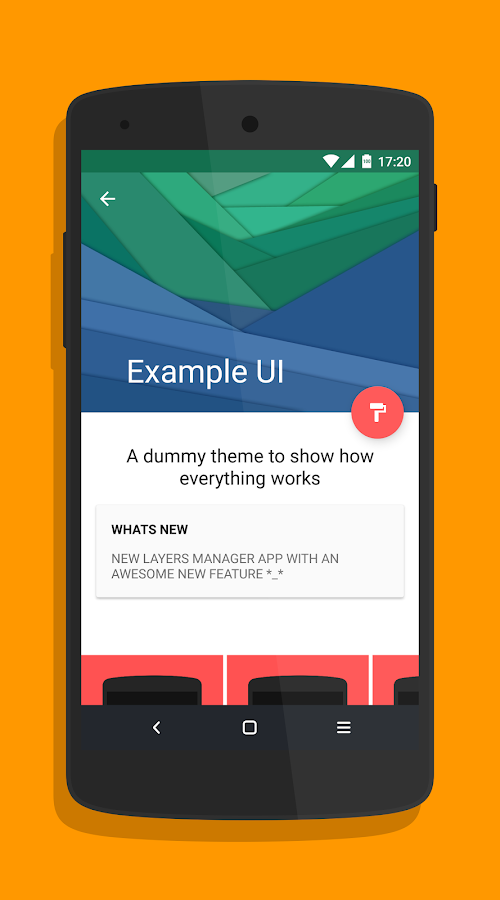
******Instructions on how to install theme support.******


  • Download the above themer.
  • Again go to play store and install theme by typing "Layers rro theme".
  • Now go to Layers manager app>>install overlays>>click on the right side bottom icon.


RECOMMENDED


-Thank You to every dev.

Lollipop ROM:OFFICIAL MiUi 7 FOR S3 i9300

Official S3 ROM made by Jing/Nian For MiUi with Multi-Language Support.

As Xiaomi has revealed the lollipop version 5.0/MiUi7 to be a global ROM supporting many devices as possible.Earlier version of Nian being MiUi6 was very good actually the best compiled MiUi ROM for S3 .

                 No major changes except for few add-ons such as Gallery,Pre-loaded themes.Most MiUi7 features are present we will update as the ROM develops.


Pre-loaded Themes


How to install


  • CWM Recovery is recommended.
  • Wipe Cache,Dalvik Cache And Factory Reset.  
  • Flash the zip file downloaded.


DOWNLOAD: