mobile etiketine sahip kayıtlar gösteriliyor. Tüm kayıtları göster

A Mobile Scavenger Hunt with Goose Chase!

I recently came across a new app called Goose Chase that allows teachers to set up a mobile scavenger hunt!  There is a wonderful no-cost plan that teachers can take full advantage of.  They can create scavenger hunts around the school, even in class during class (eg...hunting the Internet and submitting answers), or outside of school!  What an engaging snow day activity or winter break learning connection.

Access and Equity
Goose Chase works on just about any mobile device (Andriod, iPad, iPhone, even an iPod Touch).  However you do need to have Internet access because the missions can have a GPS component to them.  There is no cost for students or teachers, but you do need to download the free app to participate.  Students must have an email address to register and participate.  This could be a school gmail address (if a GAFE school) or for younger children, parents could participate with their children.

Missions!  How it Works
Teachers create an account online in Goose Chase.  Then they can start to set up their "games" (which are the scavenger hunts).  The games consist of many missions can include GPS location (go to the local bank!), a picture (find what is in this picture or analyze this image!), a video (the teacher could explain something or have a local historian explain something to look for), and a text description.  Teachers can set up as many missions in a game as they like!  Teachers can also control when the missions start and stop, as well as assigning points to each mission (an easier mission can be worth less points---students can then decide which missions they want to attempt based on points and descriptions).

When the game is ready, students can download the free app from the Andriod or iTunes store, set up an account (they do need to register with an email address).  They then type in the name of the game, it's password, click on it and begin!  The students will see all their missions and can choose which missions to try.  They will be able to submit their findings by photo, video, GPS map location and/or text!  All submissions are stored in the game, so the teacher can later use this data for in-class learning.  For example, asking students over their Spring Break to do some missions on local history, text in pictures and videos of their findings, then the teacher can use the media to talk about local history back in the classroom after break!  A wonderful way to extend the classroom learning and use authentic data!

Management
Teachers can set up the games so that they are password protected (only your students can participate) and so that the data is not shared beyond your password.  This helps to keep it all CIPA compliant.  In addition, students can create gamer handles so that they are not using their real names. Teachers can choose if they want this set up for individuals or teams (and can even have team captains).  Teachers can also block postings that might be inappropriate and change the amount of points award to teams if needed.  You can also see individual results of each student, their submissions and even easily download all of their media submissions with one easy button!

Extending Learning
Scavenger Hunts are an engaging way to extend and enhance classroom learning.  While there are many different ways that Goose Chase can be used, I wanted to share a few ideas:

Connect Learning Over School Breaks
I've already mentioned this a little, but I wanted to emphasize that this is a wonderful way to keep students focused on learning goals over the many school breaks.  In addition, it would be a great summer stretch activity for students who are moving into a new grade, they could collect authentic data that they will be using in the Fall with their new teacher(s).  For example, students going into 6th grade may collect lots of different images of local bugs, and document where they were found.  Then when they do their 6th grade science unit on bugs in the Spring, they can pull up the authentic images of the bugs found from the previous summer to compare what they found.

Social Studies
There are so many applications to social studies learning, in particular gathering data on local history, and local geography.  They can use the video submission to interview museum docents and curators, as well as collect historical interviews from citizens who participated in prominent historical events.  Finally, because the teachers can send videos with the missions, they can also help to guide and scaffold students learning by giving them hints and tips on how to interview or do historical inquiry at the museum.

Science
There is so much science in the local community, this is a wonderful way to collect images data and video data to use in the science classroom.  Such as students going to a local bog/lake and taking videos of the species, flora and fauna that they find.  Doing environmental experiments on water PH levels right at the local source (video submission) or interviewing local scientists and possibly even observing their work (again a great video submission).

English Language Arts
Scavenger hunts and journalism can work nicely together.  Being able to go on an i-search to learn about local events, history, personal stories...etc.  Collect evidence for the story in forms of media and text, and then writing or blogging about the story.

Math
What better way to do math than to be in the authentic world!  Measuring local structures by calculating area, perimeter, circumference...etc.  Doing engineering and figuring out the best location for a stop light and why.  Documenting the different times you are using math in your everyday lives and submitting it!

What are some other ways that you might use scavenger hunts in your discipline?  Please share in the comments.

AdSense Mobile Best Practices

Il mobile è critico per il tuo business e continuerà ad esserlo; che tu abbia un blog sulla tua squadra preferita, un sito di un teatro o che tu stia vendendo i tuoi prodotti a potenziali clienti, assicurati che i visitatori del tuo sito abbiamo una buona esperienza di navigazione anche quando accedono al sito dai loro dispositivi mobile.

Basta pensare al fatto che più del 21% degli utenti internet usa lo smartphone più di tablet e computer per accedere al web. (Fonte: 2014 Google Consumer Barometer) Immagina quindi un utente che accede al tuo sito da un dispositivo mobile: è in grado di leggere la pagina facilmente e trovare le informazioni necessarie o la navigazione risulta difficile?

La versione desktop di un sito può risultare difficile da vedere e usare da un dispositivo mobile. Per navigare un sito non mobile-friendly, l’utente è costretto a stringere e zoomare la pagina per poter leggere i l contenuto e questo comporta un’esperienza di navigazione frustrante per gli utenti che sono quindi più inclini ad abbandonare il sito. Al contrario, un sito mobile-friendly è facilmente fruibile e leggibile.

Per fare in modo che un sito sia mobile-friendly, ci sono alcune regole di base da tenere a mente:
  1. Semplifica la navigazione  - Il 61% degli utenti di dispositivi mobili abbandona il sito se non visualizza immediatamente ciò che sta cercando. (Source: Google Mobile Ads Blog 2012)
  2. Sottoponi il sito a test - Scegli le metriche più rilevanti per te e per i tuoi utenti e sperimenta
  3. Crea coerenza tra i dispositivi - Semplifica le ricerche dei tuoi utenti, indipendentemente dal dispositivo utilizzato
  4. Accelera le operazioni - Il 74% degli utenti abbandona i siti web per dispositivi mobili il cui caricamento richiede più di 5 secondi  (Source: Google Mobile Ads Blog 2012)
Per quanto riguarda la monetizzazione del sito mobile, il posizionamento dei tuoi annunci è la prima cosa importante da considerare. Concentrati sulla creazione di un flusso tra i contenuti e gli annunci per garantire un' esperienza utente eccezionale. Consulta i dati delle tue analisi per impostare gli eventi e scoprire i punti in cui gli utenti dimostrano di essere maggiormente ricettivi.

Di seguito alcune best practices utili per ottimizzare gli annunci da mobile:
  • Gli eCPM potenziali potrebbero aumentare se passi dalle unità pubblicitarie 300x50 a quelle 320x100
  • Fai in modo che un annuncio sbuchi Above The Fold per ottenere la migliore esperienza utente e ottimizzare i potenziali guadagni
  • Il collegamento con i social favorisce e semplifica la condivisione
  • Utilizza le unità pubblicitarie 300x250 per aumentare potenzialmente i tassi di riempimento e l'eCPM
  • Se utilizzi le funzioni migliorate negli annunci di testo, riduci i clic involontari spostandole unità pubblicitarie da 150 pixel dal contenuto
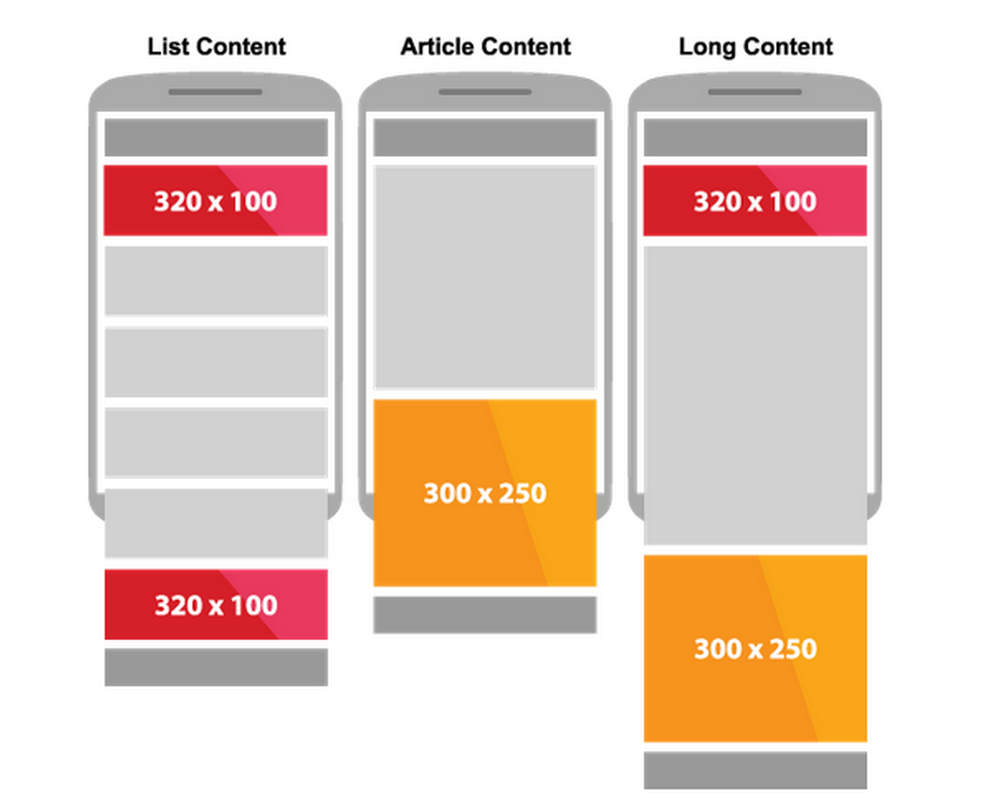
Il posizionamento migliore e la scelta dei formati più efficaci cambia a seconda del tipo di pagine e della lunghezza dei contenuti, in generale possiamo dire che:
  • nelle pagine di listing è consigliabile avere fino a tre unità 320x100;
  • nelle pagine articolo brevi, è utile avere un 300x250 che sbuca above the fold;
  • nelle pagine articolo lunghe la disposizione migliore vede un 320x100 above the fold e fino a due 300x250 below the fold.


Dal momento che il tuo sito è disegnato per gli utenti da mobile, anche gli annunci dovrebbero essere creati in questa ottica. Per questo considera l’opzione di usare annunci reattivi che ti permettono di ottimizzare la dimensione dell’annuncio a seconda delle dimensioni dello schermo sul quale vengono mostrati e si integrano perfettamente con un sito reattivo.

Scritto da Chiara Ferraris, Strategic Partner Manager 

Storie di successo locali: Qué Tiempo cresce del 30% grazie ai dispositivi mobili

Come vi abbiamo già riferito in passato, l'aumento delle vendite di smartphone e del traffico cellulare rende ogni giorno sempre più importante per i publisher Web realizzare una strategia per il proprio business che includa i dispositivi mobili. Tuttavia, solo 1 publisher AdSense su 10 dispone di una versione del proprio sito ottimizzata per i dispositivi mobili. Per incoraggiare altri publisher a seguire questa strada, Ángel Hernández e Manuel Lebrón, proprietari di Qué Tiempo, hanno condiviso con noi la loro esperienza.


Qué Tiempo è un sito spagnolo che pubblica i bollettini meteo di tutto il mondo.
Ángel e Manuel sono diventati publisher AdSense nel 2007 e nel corso degli anni, grazie all'investimento nei contenuti, all'ottimizzazione dei programmi pubblicitari e all'aumento del traffico, sono stati in grado di creare un team di oltre 20 persone e di effettuare investimenti in nuove imprese.

Nel 2008, grazie a Google Analytics avevano già notato che il traffico proveniente dai cellulari era in crescita e decisero quindi di sviluppare internamente il sito quetiempo.es/mobile.

Il traffico proveniente dai cellulari è aumentato del 20% negli ultimi due anni. Nuovi utenti arrivano sulla versione del sito ottimizzata per i dispositivi mobili, mentre la versione desktop registra una crescita annua del 10%. Questo dimostra che il traffico proveniente dai dispositivi mobili si aggiunge al traffico Web e non lo sostituisce e che l'utilizzo di tali dispositivi è complementare all'utilizzo del desktop.

L'aumento del traffico proveniente dai cellulari combinato con una riuscita implementazione degli annunci ha consentito a Qué Tiempo di accrescere del 30% le entrate giornaliere. Il CTR del leaderboard 320 x 50 per i dispositivi mobili è ora il doppio rispetto al CTR degli annunci per desktop. In aggiunta, il CPC degli annunci per cellulari è del 100% più elevato del CPC del sito desktop.

L'impegno di Qué Tiempo si concentra ora in massima parte sul miglioramento del sito per dispositivi mobili con funzioni quali il targeting geografico, che rende possibile fornire accurati bollettini meteo specifici per la località di interesse.

"Incoraggiamo gli altri publisher a realizzare siti ottimizzati per i dispositivi mobili, non solo perché vedranno rapidamente crescere le entrate grazie ai formati per cellulari di Google AdSense, ma anche perché il futuro del business online dipende dalla strategia rivolta agli utenti di questi dispositivi, che rappresentano un mercato con infinite possibilità."

Scritto da Alicia Escriba, Team Inside AdSense

Le informazioni presentate sono aggiornate alla data del 18 dicembre 2012.